Windows Genuine
Disable and Remove Windows Genuine Advantage Notifications Nag Screen
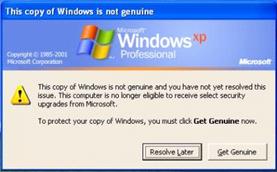
When you log on to a non-genuine copy of Windows XP, the following notification error message "This copy of Windows is not genuine" will pop-up on the logon process:
And the nicely said “You may be a victim of software counterfeiting” message on the bottom right corner of log-in screen:
Microsoft allows Windows Faithfull to have 2 options: Get Genuine or Resolve Later. Click on Resolve Later will temporarily bypass the notification and let you login into and use Windows nagged with notification icon and messages, which will randomly appear as balloon notification message with an icon in the notification area (system tray)
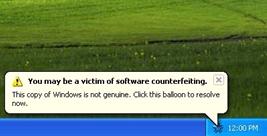
Clicking on the balloon notification or the notification area icon will lead you to the Windows Genuine Advantage Validation Failure Web page that contains the specifics of the validation failure and the steps that you can take to make the operating system genuine.
To get rid of the WGA notifications that intend to remind you that your Windows is not validated, you can buy a validly licensed copy of genuine Microsoft Windows.
Clever Aren’t They! HAHA Not that clever
First Method
Launch Windows Task Manager.
End wgatray.exe process in Task Manager.
Restart Windows XP in Safe Mode.
Delete WgaTray.exe from c:\Windows\System32.
Delete WgaTray.exe from c:\Windows\System32\dllcache.
Launch RegEdit.
Browse to the following location:
HKEY_LOCAL_MACHINE\SOFTWARE\Microsoft\
Windows NT\CurrentVersion\Winlogon\Notify
Delete the folder ‘WgaLogon’ and all its contents
Reboot Windows XP.
Note: With this method, you may be prompted to install WGA Notifications again which can still be unselected, But doesn’t always work.
Second Method
Another alternative suggested by me is by using System Restore to restore the PC to a previous restore point that WGA Notifications hasn’t kicked in, and then carefully stop KB905474 from been applied to the system. To use System Restore, go to Start -> All Programs -> Accessories -> System Tools -> System Restore.
Note: Again, you may be prompted again to install WGA Notification, so it must be bypassed.
If you are using a pirate version please buy the real windows cd my Method’s only works for some time
